Instagram Marketing in 2025: Broadcast Channels and Keywords Explained
Broadcast Channels and keyword-based discovery are two of the most useful Instagram tools for building loyalty and reaching new people.

TL;DR
Instagram Broadcast Channels send messages straight to subscribers' inboxes, bypassing the feed algorithm, which makes them ideal for sneak peeks, exclusives and feedback from your most loyal followers. To reach new people, keywords have replaced hashtags as the main driver of reach, so use the phrases your audience searches naturally in captions, Reel titles and on-screen text.
Instagram Broadcast Channels let you message your most engaged followers directly in their inboxes, bypassing the feed algorithm, while keywords, not hashtags, now drive most discovery. Use both and you build loyalty with existing followers while reaching new audiences.
Instagram keeps changing, and it keeps giving brands new ways to reach the right people, deepen engagement and build loyalty. In 2025, these two features stand out for small and medium businesses and marketers. Used well, they make sure your content is seen, valued and engaged with by loyal followers and newcomers alike.
What are Instagram Broadcast Channels?
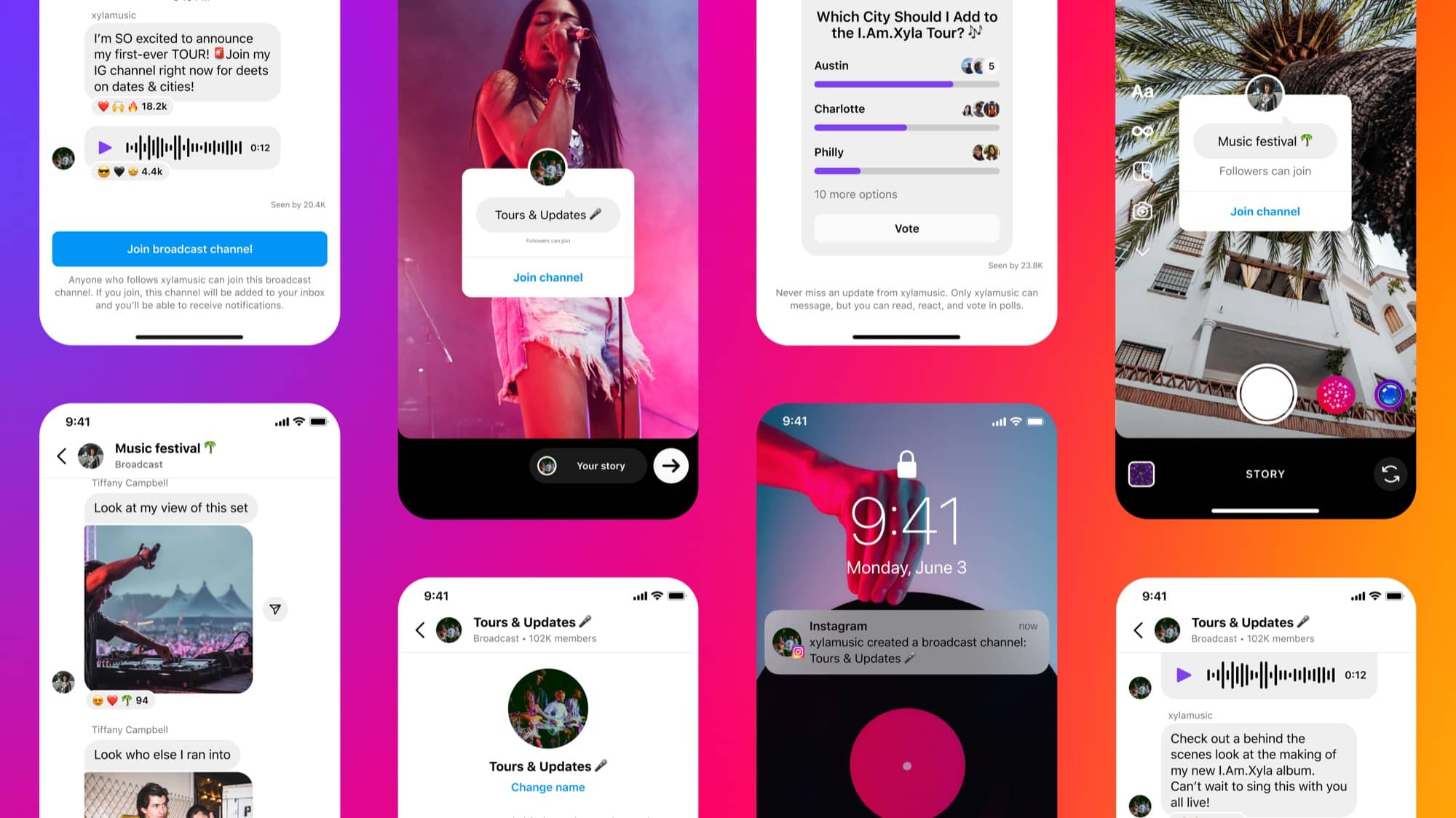
Broadcast Channels are one of Instagram's most underused tools for building community and loyalty. They let brands and creators talk directly to their most engaged followers through one-way messages delivered straight to their DMs.
Why do Broadcast Channels work?
- Direct connection: Messages land in subscribers' inboxes, bypassing the feed algorithm.
- Multi-format content: Share text, images, videos, voice notes, polls and prompts.
- Exclusive access: Subscribers feel like insiders, which strengthens loyalty and engagement.
How are brands using Broadcast Channels?
Brands and creators are already seeing the benefits. Clothing labels Parke and Set Active use them to give followers sneak peeks at upcoming launches and exclusive previews, while skincare brand Cocokind asks subscribers for feedback on products, so customers feel part of the process. Photo app Tezza shares quick tutorials and tips to help users get more out of its tools. Even bigger brands, such as Netflix and Elite Daily, run niche channels to connect with specific groups within their audience.
How do you set up a Broadcast Channel?
- Open your Instagram DMs and tap the pencil icon in the top right corner.
- Select Create Broadcast Channel, name it and choose your audience (all followers or paid subscribers).
- Share the invite link in your Stories, posts or bio to start building subscribers.
How do you get the most from your Broadcast Channel?
- Offer content that's only available in your channel.
- Post regular updates to keep subscribers engaged.
- Use polls, questions and prompts to encourage interaction.
- Promote your channel in your Stories, bio and posts so more people find it.
- Try collaborators or guest contributors to keep content fresh.
- Bring in moderators if your audience grows large.
Broadcast Channels are more than a messaging tool. They create a VIP space for your most dedicated followers, helping you build loyalty, collect feedback and strengthen your brand community.
Why do keywords matter more than hashtags on Instagram?
Hashtags are no longer the main driver of reach. Instagram now prioritises keyword-based discovery, which makes a keyword strategy essential for your brand. Keywords are the terms your audience types into Instagram or TikTok search. They can be broad, like "property management", or specific, like "Auckland rental inspections".
How do you find the right keywords?
On TikTok:
- Search for topics related to your content, or for similar videos.
- Study the top-performing videos and note phrases that repeat in titles or on-screen text.
- Check "Related Search Terms" for high-volume variations.
On Instagram:
- Study three to five accounts in your niche and their top-performing Reels.
- Note recurring phrases, captions and on-screen text.
- Use what you find to build a keyword list for your content.
What are the best practices for Instagram keywords?
- Keep it natural: Write captions and text the way a person would speak.
- Provide value: Use keywords in context, in posts that answer your audience's questions.
- Place them well: Use keywords in captions, Reel titles and on-screen text where relevant.
Here's the difference in practice.
Keyword-stuffed caption: "Property management Auckland rentals apartments houses property maintenance tenant services commercial property listings property inspections maintenance reports residential property management."
Optimised caption: "Looking for a reliable property manager in Auckland? We help landlords find tenants, manage inspections and keep properties in top condition so you can focus on what matters most."
Used well, keywords help your content get discovered while keeping it useful and engaging.
Key takeaways
In 2025, Instagram growth relies on community and discoverability:
- Broadcast Channels: Engage your most loyal followers directly, collect feedback and share exclusive content.
- Keywords: Swap hashtag-stuffing for search-friendly, relevant terms to boost discoverability.
Together, these features help you connect with your audience, build loyalty and reach new users without relying solely on ad spend. Test a Broadcast Channel, research keywords for your niche and optimise your content so your brand stays visible and relevant.
If you'd like a hand building a social media strategy that makes the most of these Instagram features, let's grab a coffee and talk about how to make it work for your brand.
Want a hand with this?
Our Auckland team does Social media for New Zealand businesses every day.
- Broadcast channels
- Keywords
- Social media marketing